
When you happened to delete files and folders from OneDrive storage, don’t worry, you still have a chance to restore them within 30 days. According to Microsoft, the removed documents, photos, video games, music, movies and program data files from OneDrive in Windows 10 are not lost at once. Instead, OneDrive keeps the deleted items in its recycle bin for a maximum of 30 days and a minimum of 3 days.
To undelete OneDrive files in Windows 10, follow the instructions given below.
Step 1. Right-click OneDrive icon and select “view online”.
Step 2. Sign in your OneDrive account on the OneDrive website: https://onedrive.live.com/about/en-us/.
Step 3. Click the “Recycle Bin” button in the left pane.
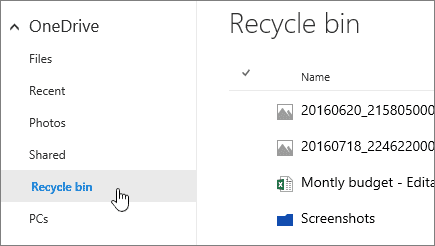
Step 4. All the deleted files and folders will be displayed in the right pane. To restore specific files or folders, pick them by selecting their checkbox, to restore all items, click “Restore all items”.